Simple Checkbook Ledger
- 3.4
- Rating
- 100.00K
- Installs
- Free
- Price

 Analysis by App-foxy
I found Simple Checkbook Ledger most useful when I stopped treating it like a modern banking app and started using it for what it is: a focused way to record money coming in and going out. In a household, that difference matters. It can help one person keep a running view of an account, or let a family member maintain a separate record on a shared device, but it is not a replacement for the bank’s own app.
Developed by Teelu Apps, this free finance app has a straightforward purpose: make everyday checkbook-style tracking less dependent on paper. The store summary, “Manage your accounts with ease,” is a fair description, although my experience is that the value comes from disciplined manual entry rather than automatic financial management. The short description, “Simple Checkbook Ledger,” is even more accurate. It is deliberately narrower than a full budgeting suite.
That narrow focus is both its appeal and its main limitation. If I want to know whether I have already accounted for a grocery purchase, a bill, or a cash withdrawal, a ledger can be quicker and less distracting than a large financial dashboard. If I want automatic bank synchronization, investment tracking, shared live access, or detailed spending analytics, I would look elsewhere.
You May Also Like

 Blood Strike: 2.5 Anniversary
Blood Strike’s Loadouts Turn Every Drop Into a Tactical Gamble
A close look at Blood Strike’s custom loadouts: how fast access to signature weapons reshapes its battle royale rhythm, rewards preparation, and narrows the gap between fights.

 Pandora - Music & Podcasts
Pandora’s Music Is Easy to Start, but Harder to Recover
Pandora’s strength is its low-effort path from a seed to a station. Its weak spot is how much confidence it asks you to place in connection, setup, and quiet recovery.

 8 Ball Pool
 Is Built on Rivalries, Rematches, and Routine
A close look at the rivalries, rematches, shared routines, and unanswered safety questions that turn a quick pool match into a persistent mobile community.

 Samsung Music
’s Quiet Strength Is Playing What You Already Own
Its reach comes less from spectacle than from dependable access to a personal library. That simplicity is both the app’s strongest retention engine and its ceiling.

 AccuWeather: Weather Radar
AccuWeather Review: A Quick, Clear Forecast for Everyday Decisions
For everyday plans, the best forecast is the one you can understand quickly. AccuWeather makes rain timing, radar, and local conditions easy to act on, with a few trade-offs.

 Hill Climb Racing
Why Hill Climb Racing Still Turns Crashes Into One More Run
A tiny car, a bumpy hill and one more upgrade: Hill Climb Racing keeps resurfacing because its simple chaos makes every near-miss feel personal.
More From Our News Desk



Using one ledger in a household without mixing accounts
When several people use one device, I find it helps to agree on who records each purchase before the first entry goes in. This section looks at keeping household and personal balances distinct, then turns to the practical choices that make a shared ledger easier to maintain.
A practical shared-device scenario
Imagine a household where one person pays regular bills from a checking account while another person occasionally records cash spending. On a shared phone or tablet, a simple ledger can act as a common memory: each transaction is entered when it happens, and the running balance gives everyone a clearer picture of what has already been counted.
I would use it after a supermarket trip, for example, rather than waiting until the end of the week. The person who makes the purchase can record the amount immediately, while the person reviewing the account later can compare the ledger with the bank balance. That small habit is more valuable than any decorative feature because it reduces the chance of forgetting small transactions.
The important boundary is that the app should be treated as a record, not as a shared bank account. It does not turn a household into one financial profile. Each account or ledger should represent one real-world balance, and the people using the device need to agree on what belongs there. A personal checking account, a joint household account, and a cash envelope should not be casually mixed into one running total.
That separation is especially helpful when several people contribute to household expenses. If I record a utility payment in the joint account ledger, I know it affects that account’s expected balance. If I also record my personal coffee purchases there, the household picture becomes misleading. The app can support careful organization, but it cannot decide which expenses belong to which person.
Setting up sensible account boundaries
My first recommendation is to decide the purpose of each ledger before entering old transactions. Is it meant to mirror a bank account, track cash, or provide a short-term spending record? Choosing one purpose keeps the balance meaningful. Starting with a clean boundary is easier than correcting a mixed history later.
For a shared device, I would also agree on a naming system that makes the account’s role obvious. Names such as “Household checking,” “Personal spending,” or “Cash on hand” are more useful than vague labels. This is not about making the app look tidy; it prevents someone from recording a transaction in the wrong place when they are in a hurry.
Another useful habit is to enter pending obligations as soon as the household knows about them. A bill that has been scheduled but has not yet cleared can affect what is safe to spend. At the same time, I would avoid pretending that an unprocessed payment is already final if the household uses the ledger to reconcile against the bank. The record should make the status understandable to everyone using it.
This is where a paper notebook can sometimes feel more flexible, but the app has an advantage in consistency. A notebook may be left in a drawer or become difficult to read after several months. A digital ledger is easier to consult during an errand. The trade-off is that every user must understand the same entry routine, because a digital record is not automatically accurate just because it is digital.
Coordinating entries between people
Simple Checkbook Ledger works best when the household agrees on a small routine. One person can enter transactions, while another checks the balance against the relevant account. Alternatively, everyone can record their own purchases, provided they use the same categories or notes. The app does not need to become a family meeting; it simply needs a shared method.
I would establish a rule that the person making a purchase records it before moving on, especially for cash transactions. Cash is easy to forget because there may be no later bank notification to remind you. For card payments, the bank app may eventually show the charge, but entering it in the ledger immediately gives a more realistic view of available money.
A weekly review is another practical workflow. I would compare recent ledger entries with the bank’s transaction list, mark down anything missing, and investigate any balance difference before it grows. This makes the app useful even for people who do not want to track every category in detail. The goal is not perfect financial theory; it is catching mistakes while they are still easy to explain.
There is a subtle trade-off here. A shared ledger can improve coordination, but it can also create confusion if two people enter the same purchase. The household should decide whether the person who paid records the transaction or whether one designated reviewer does all entries. Both approaches can work. Mixing them without a clear rule is what causes trouble.
I also would not use the ledger as evidence that another person has approved a payment. A recorded transaction says what was entered, not necessarily who authorized it or whether the bank has completed it. For household trust, the app should support conversation rather than replace it.
Privacy, age, and trust in everyday use
The Everyone content rating makes the app approachable for a broad audience, including older children learning how balances work and adults who prefer a plain financial tool. That does not mean every child should be given unrestricted access to a household’s financial information. Age suitability and financial responsibility are separate questions.
For a teenager, I could see a ledger being useful for tracking an allowance, cash spending, or a personal account that the teenager is learning to manage. I would keep that record separate from the household account. The lesson becomes clearer when the young user can see how an entry changes a balance without being exposed to information that belongs to other family members.
For an older relative, the simple checkbook approach may be less intimidating than a banking app filled with transfers, alerts, offers, and account summaries. A trusted family member could help establish the ledger and explain the entry routine. However, I would be careful about entering sensitive financial details on a device used by several people. Shared access requires trust, and the app should not be treated as a secure substitute for account-level privacy.
This is also why I would avoid using one ledger for multiple people’s private spending. Even when the intention is cooperation, a combined history can expose habits or purchases that do not need to be visible to everyone. Separate account records create a cleaner boundary. They also make reconciliation easier because each balance has a clear owner and purpose.
Families should discuss who is responsible for correcting mistakes. If someone enters the wrong amount, the best response is to fix the record promptly and leave a note for the person who checks it. Quietly changing figures later can make the history harder to trust. A simple app encourages simple habits, but honest coordination still depends on the users.
What the version and pricing mean in practice
The current version is 3.5, and the app runs on operating systems starting with version 11. That requirement is worth checking before installing it on an older household device. A shared tablet that no longer supports the necessary system version could be the one practical obstacle, even if the app itself would otherwise suit the family.
There is no purchase price to get started, while optional in-app purchases are listed at $1.99 per item. I would approach those purchases as convenience decisions rather than assume they are necessary for basic ledger use. A household should first test whether the core recording routine fits its needs before spending anything.
The app’s reach is substantial for such a focused tool, with over one hundred thousand installs. Its average rating is 3.4 from around two and a half thousand ratings, alongside roughly one thousand two hundred written reviews. I read that combination as a sign to keep expectations realistic: people are interested in the concept, but it is not universally satisfying. The rating does not make the app unusable, but it does reinforce the need to decide whether a manual ledger matches your habits.
Because it is free, the cost of trying it is low. The more important cost is attention. If the household repeatedly forgets to enter purchases, the ledger will give a false sense of control. A free app cannot compensate for missing information. In my view, the best test is not whether the interface looks convenient during setup, but whether everyone can maintain the routine for several weeks.
Where it beats a bank app, notebook, or budgeting suite
Compared with a bank app, Simple Checkbook Ledger offers a more deliberate record. A bank app shows what the institution knows, which can be delayed or incomplete from the perspective of a household’s immediate spending decisions. A ledger lets me record a cash purchase or an expected payment before the bank’s history catches up.
The bank app remains better for confirming cleared transactions, checking official balances, moving money, and reviewing account security. I would use both together rather than choosing one as a total replacement for the other. The ledger is the planning layer; the bank app is the authoritative account view.
Compared with a paper checkbook, the digital format is easier to carry and less vulnerable to handwriting problems. It can be consulted while standing in a store, which is a meaningful advantage for a person trying to avoid overspending. Paper may still be preferable for someone who wants a completely offline, tangible record or who does not share a device with other household members.
Compared with a full budgeting app, this tool is less demanding. A large budgeting platform may offer categories, reports, goals, recurring plans, and connections to financial institutions. Those features are useful when a household wants broad analysis. They can also make a simple question—“What should this account balance be after today’s payment?”—harder to answer quickly.
The trade-off is that a ledger does not give the same big-picture explanation of spending. If I need to identify a pattern in dining, subscriptions, transport, or debt payments, a dedicated budget system is likely better. Simple Checkbook Ledger suits users who value direct balance tracking more than elaborate financial reporting.
Limitations I would consider before relying on it
The central weakness is manual maintenance. Every missed transaction weakens the balance, and a shared device adds another opportunity for delay or duplication. This is manageable for a disciplined individual, but less suitable for a busy household where nobody clearly owns the process.
I would also be cautious about using it for complicated finances. Multiple currencies, several institutions, business expenses, reimbursements, and detailed tax records can quickly outgrow a checkbook-style approach. The app may still help with one straightforward account, but I would not make it the only record for situations that require formal documentation.
Another limitation is conceptual rather than technical: a ledger shows entries, but it does not settle disagreements. If two household members remember a purchase differently, the app cannot determine who is right. Good notes and regular reconciliation help, yet the users remain responsible for interpreting the record.
People who expect automatic synchronization may find the workflow frustrating. The appeal of this app is precisely that it keeps the user involved in recording transactions. That is a strength for privacy-conscious or hands-on users, but a weakness for anyone who wants financial information to update without effort.
I would skip it if my main goal were investment management, credit monitoring, automatic categorization, or a complete family budgeting system. I would also skip it for a shared household where members are unlikely to agree on account boundaries. In that situation, a coordinated spreadsheet or a purpose-built shared finance service may provide clearer ownership and history.
Small habits that make the ledger more reliable
One useful technique is to reconcile in two passes. First, check whether every recent bank transaction appears in the ledger. Then check whether every ledger entry has a sensible place in the bank history or cash record. Looking in both directions catches errors that a quick balance comparison can miss.
I would also record the purpose of unusual transactions in plain language. A large transfer, a reimbursement, or a shared purchase can look mysterious later. A short note explaining “paid household bill” or “reimbursed by partner” saves time when someone reviews the account after several days.
For shared use, choose one moment when the ledger is considered current. For example, the household might agree that entries are reviewed after dinner or at the end of the week. This creates a dependable checkpoint without requiring everyone to monitor the record constantly.
Finally, keep the number of active ledgers limited to real needs. Creating separate records for every tiny spending category can make the app feel organized while actually making it harder to maintain. I prefer one ledger per genuine account or cash pool, with clear descriptions for individual transactions. That preserves the simplicity that makes this app attractive in the first place.
My household verdict
After looking at how it fits shared-device use, I see Simple Checkbook Ledger as a modest but practical finance app for people who want hands-on control over one or a few straightforward balances. Its strongest use is not sophisticated planning; it is giving a household a quick, understandable place to record transactions before they disappear from memory.
The deciding question is whether your household will keep the record up to date. If the answer is yes, the app can make cash spending, pending payments, and everyday account coordination easier to follow. If the answer is no, an automatic banking or budgeting alternative will probably serve you better, even if it offers more complexity.
I would recommend it to an individual, couple, or small household that wants a digital checkbook and is comfortable maintaining entries manually. I would keep personal and shared accounts separate, agree on who records purchases, and use the bank app for official confirmation. With those boundaries, its plain approach becomes a benefit rather than a drawback.
For me, the free price and familiar ledger model make it worth trying on a compatible device, especially for a household that finds larger finance apps overwhelming. Teelu Apps has kept the idea focused, but that focus means users must bring their own organization and trust. Simple Checkbook Ledger is best understood as a shared record-keeping tool, not a complete financial command center, and it works well when everyone treats it that way.
FAQs for Simple Checkbook Ledger
01What is Simple Checkbook Ledger used for?
Simple Checkbook Ledger is designed to help you record and monitor personal financial transactions in a straightforward way. You can enter income, expenses, deposits, withdrawals, and other account activity, then review your running balance. It is especially useful for people who want a simple digital checkbook without the complexity of full budgeting or banking applications.
02Does Simple Checkbook Ledger connect directly to my bank account?
Simple Checkbook Ledger is primarily intended for manual transaction tracking rather than automatic bank synchronization. In practice, you generally enter transactions yourself and use the app to keep your records organized and your balance updated. This can provide more control and privacy, but you should confirm the current version’s features before downloading if automatic imports or bank connections are important to you.
03Can I use Simple Checkbook Ledger for multiple accounts?
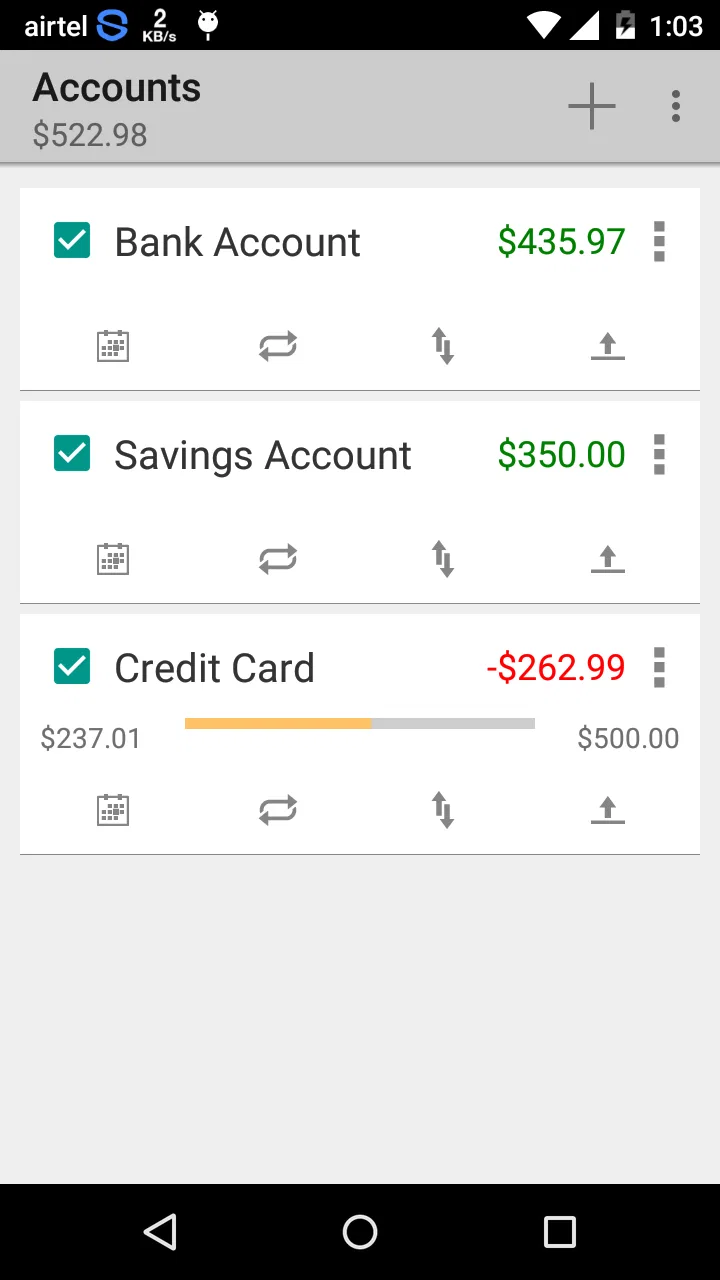
The app may be suitable for tracking more than one financial account, depending on the version and platform features available. Users commonly want separate records for checking, savings, cash, or other accounts, so it is worth checking how account creation, switching, and balance management work in the current release. Testing these options early can help ensure it matches your financial organization needs.
04Is Simple Checkbook Ledger easy to use for beginners?
Yes, the main appeal of Simple Checkbook Ledger is its uncomplicated approach. The interface focuses on entering transactions and viewing balances instead of presenting a large number of advanced financial tools. Beginners should find the basic workflow relatively easy to understand, although accurate results depend on entering every transaction correctly and keeping the opening balance synchronized with the real account.
05Is Simple Checkbook Ledger safe for storing financial information?
Because a checkbook ledger can contain sensitive details, you should review the app’s privacy policy, permissions, backup options, and security features before using it extensively. Avoid entering unnecessary banking credentials, full card numbers, or other confidential information. A manual ledger can reduce the need for bank access, but you should still protect your device and use any available passcode or privacy controls.
Pros
- Simple layout makes daily income and expense entries quick.
- Works well for users who prefer manual financial tracking.
- Separate accounts help organize cash
- bank
- and other balances.
- Useful for monitoring spending without complex budgeting tools.
- Lightweight design is suitable for older or less powerful devices.
Cons
- Manual entry can become tedious for frequent transactions.
- Limited automation compared with full-featured finance apps.
- May not provide advanced charts or detailed spending analysis.
- Users may need to create regular backups to protect ledger data.
- Not ideal for managing shared household finances or multiple users.

Simple Checkbook Ledger
Gallery